⏱ 3 min
Before the Go live...
- Contractual agreements have to be done,
- Tests and Invoicing must be checked & approved by Ratepay!
- Get test credentials from your Ratepay representative
- Set up your test environment
- Give your team members access to ORCA test environment
- Send to your Ratepay representative:
- a logo with high resolution
- color codes for Corporate identity look
- customer service data (phone, e-mail, opening times)
This is needed for the correspondences, sent by Ratepay to buyers.
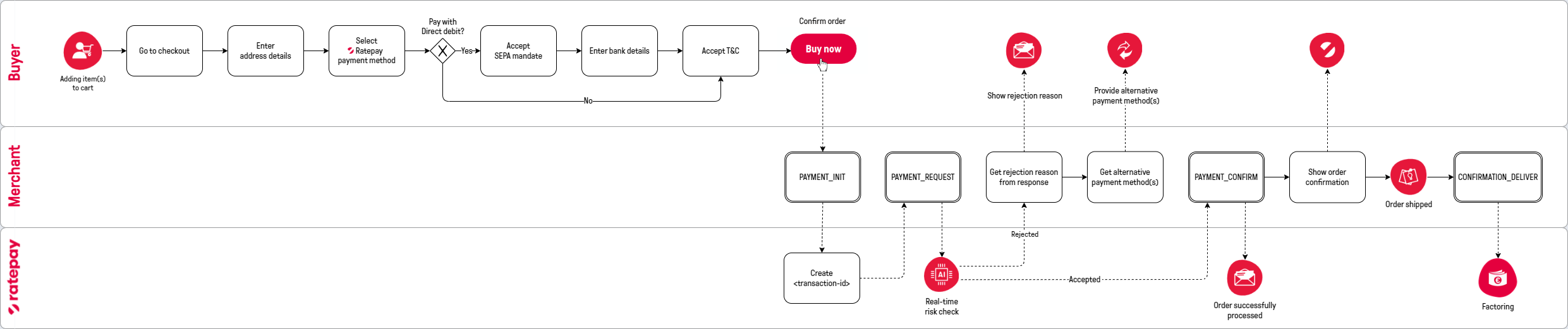
- Install & configure the Ratepay module for your shop system
- Show Ratepay payment method(s) in your checkout (Optional: Logos can be found here)
- Display Ratepay's legal requirements in your GTC
- Forward transaction-id for followup operations & descriptor for Invoicing to ERP
- Implement followup operations (e. g. in ERP):
- Do the Testing
- Create or adjust the invoicing document for the buyer
- Optional & if contractually agreed: Submit Regular Customers
- Optional & if contractually agreed: Implement Transaction Status API
- Get live credentials from your Ratepay representative
- Set up your live environment
- Give your team members access to ORCA live environment