Configure Shopify to not capture the orders automatically
Navigation: Settings → Payments → Payment capture → manuallyEnter your VAT-ID for tax calculation
Navigation: Settings → Taxes → Tax regions → EU → Set up → VAT → collect VATCustomize your theme:
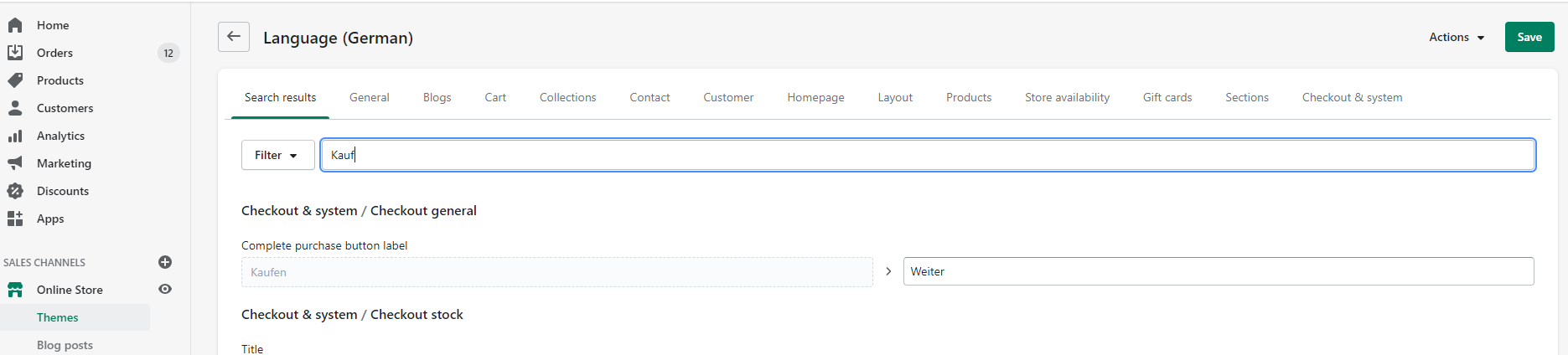
- Navigation: Sales Channels → your Store → Themes → Actions → Edit languages → Complete purchase button label
- Modify this button to a label like "Weiter" or "Fortsetzen" otherwise you will have two times the button with the label "Kaufen" in your checkout
Adding the Ratepay payment methods:
- Navigation: Settings → Payments → Alternative payment methods → choose alternative payment
- Add Rechnung / Facture / Invoice and/or SEPA / ELV
- Enter now the Shop Identifier and Security Token you get in the linking wallee & Shopify step