When offering Ratepay Pay in 3, specific legal disclosures must be presented during the buyer journey.
The checkout disclosures are mandatory. Showing Pay in 3 information on the product page and cart page is optional, but recommended to support a transparent buyer journey.
This page explains what must be shown, where it must be shown, and which elements are optional or mandatory.
This page covers legal display requirements only. For technical implementation details, value calculation, field mapping, and integration examples, see the Pay in 3 Integration Guide.
The examples below illustrate the two main disclosure contexts in the buyer journey.
| Screen | Stage | Requirement | Explanation |
|---|---|---|---|
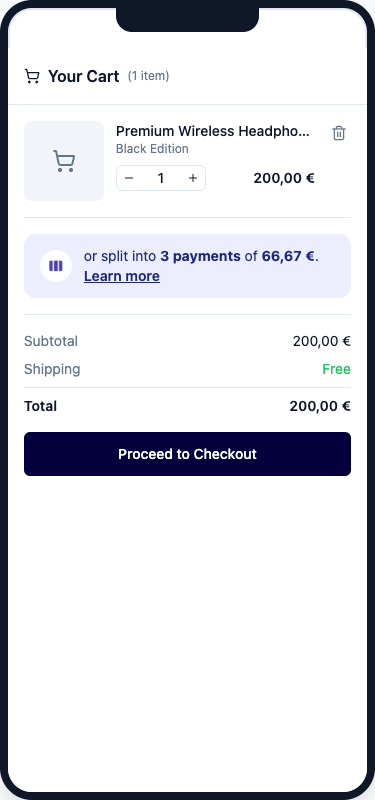
 | Product / Cart | Optional | Optional teaser before checkout. If shown, the buyer must be able to access the relevant plan details. |
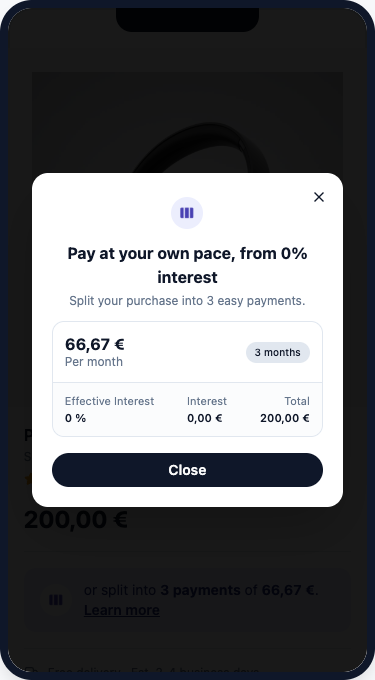 | Product / Cart | Optional | Modal with relevant plan details if teaser is used. |
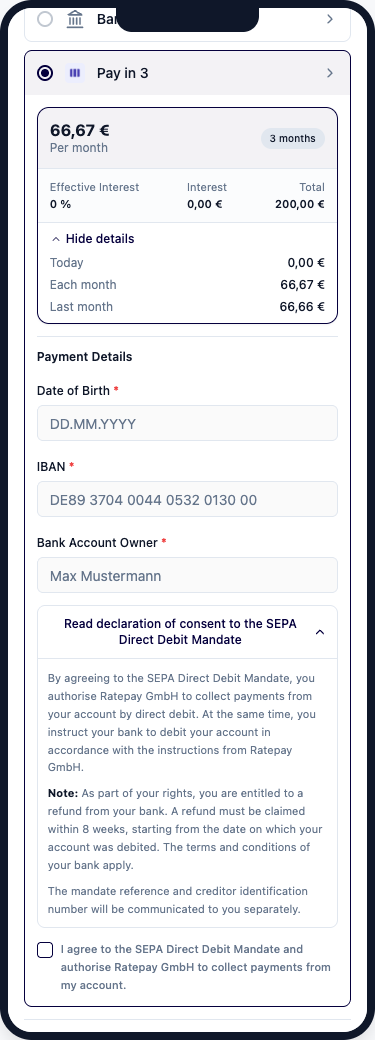 | Checkout | Mandatory | Mandatory legal disclosures once the buyer selects Pay in 3. |
Displaying Pay in 3 information on product and cart pages is not legally mandatory, but strongly recommended. If you choose to display Pay in 3 on these pages, the disclosure rules below must be followed.
If Pay in 3 is shown before checkout, the buyer must see:
- the monthly instalment amount
- the duration
- a clearly accessible Learn more link or similar interaction that reveals the relevant plan details
If Pay in 3 is shown, the displayed values must reflect the current product price or cart total.
The detailed view must show:
| Label in UI | German label | Description |
|---|---|---|
| Per month | Monatliche Rate | Monthly instalment amount |
| Duration | Laufzeit | Number of instalments and duration |
| Effective Interest | Effektiver Jahreszins | Annual percentage rate of charge (APR) |
| Interest | Zinsbetrag | Total interest amount |
| Total | Gesamtbetrag | Total amount payable |
The value calculation and field mapping for these disclosures are described in the Pay in 3 Integration Guide.
| Product Teaser | Cart Teaser | Modal |
|---|---|---|
|  | |
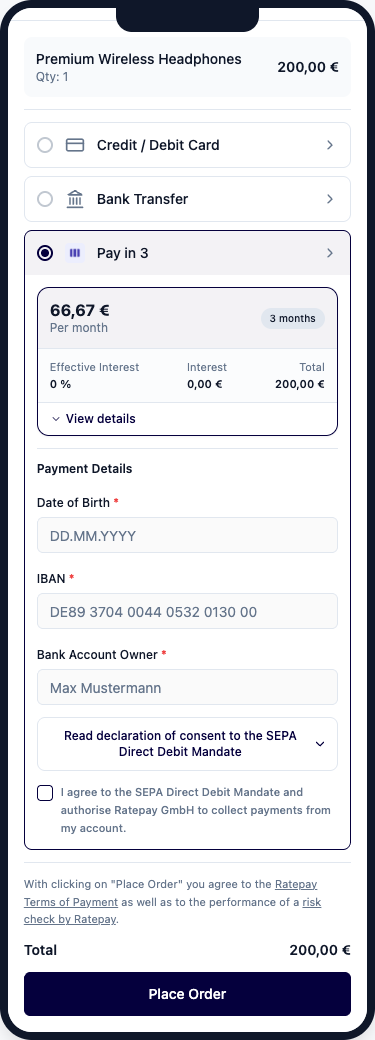
At checkout, the following disclosure areas are required when the buyer selects Pay in 3 as the payment method.
When the buyer selects Pay in 3 at checkout, the following credit terms must be visible.
| Label in UI | German label | Description |
|---|---|---|
| Per month | Monatliche Rate | Monthly instalment amount |
| Duration | Laufzeit | Number of instalments and duration |
| Effective Interest | Effektiver Jahreszins | Annual percentage rate of charge (APR) |
| Interest | Zinsbetrag | Total interest amount |
| Total | Gesamtbetrag | Total amount payable |
| Monthly instalment amount | Monatliche Rate | Regular instalment amount shown to the buyer |
| Final instalment amount | Letzte Rate | Final instalment amount, which may differ slightly because of rounding |
The value calculation and field mapping for these disclosures are described in the Pay in 3 Integration Guide.
The exact presentation of instalment amounts for the repayment plan may vary depending on the merchant checkout design. For example, the instalment breakdown may be shown as recurring instalments plus final instalment, or as separate monthly instalments.
| Example presentation | Description |
|---|---|
| Each month / Last month | Shows the regular instalment amount and the final instalment amount if it differs due to rounding. |
| 1st month / 2nd month / 3rd month | Shows the amount due for each instalment month individually. |
A detailed payment schedule with specific due dates should not be shown at checkout by default, because actual due dates depend on shipment and are not final at this stage. A simplified breakdown can be used as a buyer-friendly UX pattern, but it is not itself a separate legal requirement.
A SEPA Direct Debit Mandate text must be displayed together with a consent checkbox that the buyer must actively confirm before the order is placed.
For the full SEPA mandate wording and integration requirements, see SEPA Integration — Legal Requirements.
These are specific to the Ratepay payment method and must be shown in addition to the merchant’s own general terms and privacy information.
For the required wording and link targets, see Basic Integration — Legal Requirements.
| Checkout compact view | Checkout expanded view |
|---|---|
 | |
Any deviation from the standard Ratepay Pay in 3 presentation or legal disclosure setup requires prior written approval from Ratepay.
This applies regardless of the technical implementation method.