Use this guide if buyers complete Ratepay payments on the Hosted Payment Page (HPP).
Before you start:
- New to CCD2? Read What is CCD2?.
- Check whether CCD2 applies to you: Do I need to take action?.
- See who does what: HPP: Your CCD2 responsibilities
Where BNPL is promoted, relevant costs and risks must be communicated clearly. Available payment methods should also be presented without undue emphasis on credit.
Before you continue, check that:
- All available payment methods are visible from the start
- No in-scope method is pre-selected or emphasised
- The buyer makes the choice.
Choose one of the two experiences described in Hosted Payment Page buyer experience. We recommend Automatic SECCI email. Inform your Ratepay representative which experience you want, and Ratepay sets it up for you.
| SECCI experience pattern | HPP Design | What this means for you |
|---|---|---|
| Recommended: Automatic SECCI email | 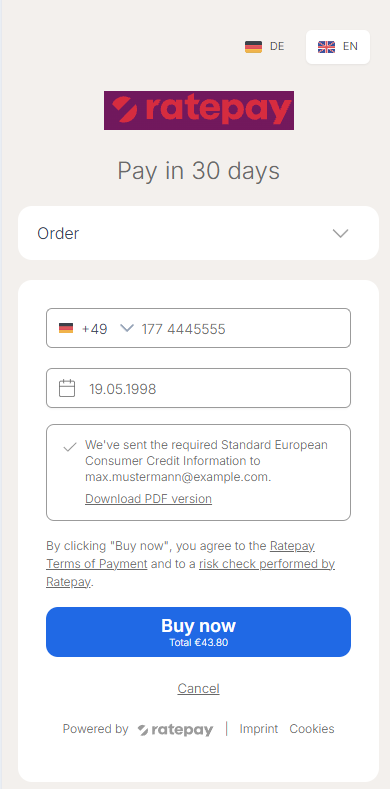 | Add a SECCI notice to your checkout (Step 3). |
| Explicit SECCI interaction | 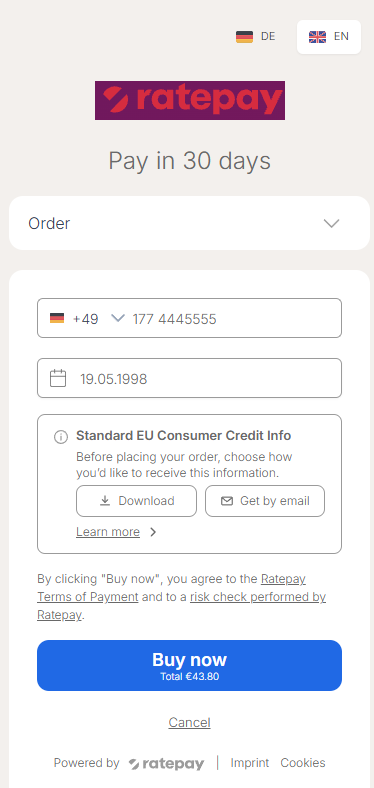 | No change to your checkout. Ratepay shows the notice on the HPP. Skip step 3. |
Note: This step is only needed if you prefer Automatic SECCI email from step 2 as SECCI buyer experience.
- Show the SECCI notice in your checkout after payment method selection. See example below.
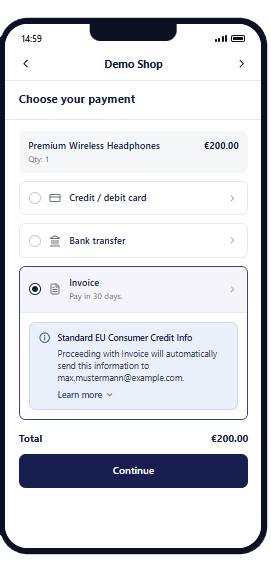
Suggested buyer-facing copy:
- Header: Standard EU Consumer Credit Info
- Text: Proceeding with [affected Ratepay payment methods] will automatically send this information to [buyer email].
- Expandable section: Learn more
- Learn more text:
EU consumer credit rules have changed and now require additional information for [affected Ratepay payment methods]. This information helps you understand the key credit terms before completing your purchase. Our payment partner Ratepay will use your email address solely to send it, using a third-party email delivery provider.
Before you continue, check that:
- The SECCI notice is shown in your checkout when the in-scope payment method is selected.
This step is needed if your system reads decline categories or reasons from the session record API or webhooks.
CCD2 introduces new decline categories and reasons: CREDIT_RISK. They appear in the session record API and in webhooks upon CCD2-enablement.
If your system only accepts a fixed list of values, update it so that:
- it recognises the new values and maps them as you need, for example
CREDIT_RISKas a credit decline - an unknown value is treated as a general decline instead of causing an error, so future additions won’t break it
You don’t need to show the decline explanation to the buyer, because Ratepay already shows it on the HPP.
Before you continue, check that:
- Your system processes the new decline values without errors
- An unknown decline value doesn’t break post-purchase experience
No action needed. Continue your normal order process.
When you capture the transaction, Ratepay sends the Credit Contract Information to the buyer. If the amount increases later, Ratepay provides any updated credit information. There is no new SECCI generation request or token after checkout.